Hello there This is your first time to login from this IP. Have fun with Enterprise Q&A
0 投票
分类:Linux | 用户: (2.2k 分)

https://www.mmuaa.com/post/6aa0b865ca947082.html

使用nslookup查询DNS的A记录、TXT记录、MX记录、Cname记录

发布于  / 小技巧 / 0 条评论

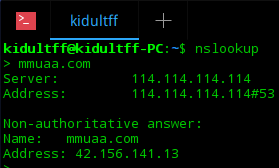
在Windows或Linux平台的命令行中直接输入nslookup即可打开nslookup。

接着输入一个域名,即可查询A记录:

深度截图_选择区域_20180825132220.png

这里的server表示DNS服务器,Non-authoritative answer表示非权威应答,即DNS服务器的缓存。

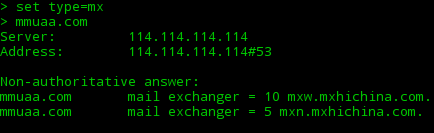
输入set type=mx,就会把查询状态调整到mx,接下来输入的域名全部查询mx记录:

深度截图_选择区域_20180825132430.png

同样的,输入set type=txt,set type=cname可以查询相应的记录。
你的回答

昵称(可选):
隐私:你的邮箱仅用于接收通知。
Welcome to Memo QA
欢迎来到Memo快速问答

分类

...